What is a family dashboard?
A family dashboard is one always-on screen, somewhere everybody walks past, showing what the household needs to know today. The idea is not new. It's the cork noticeboard by the door and the whiteboard on the fridge. The only difference is that a screen keeps itself up to date.
What goes on one
Most family dashboards end up showing some version of the same six things, because these are the questions that get asked out loud every morning.
The calendar, merged
Everyone's events in one list rather than four separate phones. Pulled from Outlook and Google automatically, colour-coded by person, so no one has to copy anything across by hand.
Today's jobs
The short list that comes round again: beds, reading, bins, the dog. Set which days each one appears and tick them off on the screen as they get done.
The longer goals
Things that need more than a day. A weekend away, finishing a project, four film nights before the month is out. Whatever doesn't get done rolls into next month.
Where everyone is
A card each with a bar that fills as they go. Points, pocket money, screen time, a chore chart — however your house counts it, and it can count down as well as up.
Weather and time
The clock and the next few hours. Mostly this answers one question, which is whether anybody needs a coat before they leave.
What's for tea
Your own recipes with your own photos, searchable, at a size you can read from a step back with your hands full.
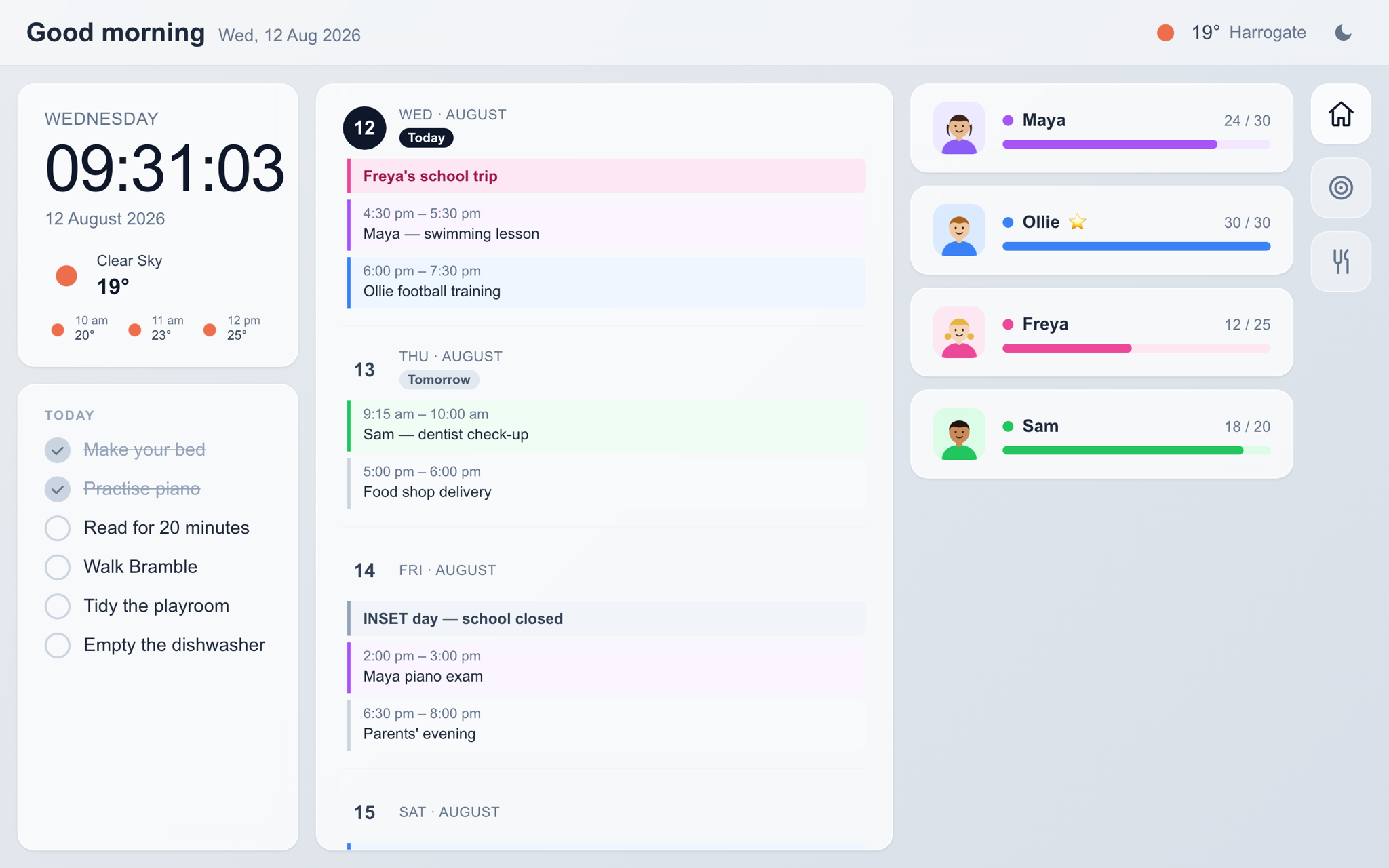
Family Board running on a wall-mounted tablet.
You probably already own the hardware
There are purpose-built family display units sold for this, priced somewhere between about £200 and £600. They're well made and they work. They are also a single-purpose device you have to buy up front, mount, and eventually replace when it stops getting updates.
The other route is to run the dashboard as software on a screen you already have. An old iPad, an Android tablet, a Fire tablet, a laptop propped on a shelf. Family Board runs in the browser, so there is nothing to install and no hardware to buy before you find out whether your family will actually use it.
If you decide it's earning its place and you'd rather buy a tablet for the job, a decent 11-inch one with a mount and a flat cable comes to around £215.
Putting one up
The setup is mostly done sitting down with a laptop, and takes about ten minutes. After that the board runs on its own and you only go back into the admin when something changes.
- 1Make an account and say roughly where you live, so the clock and weather are right.
- 2Add everyone, connect Outlook or Google, and put in the jobs that come round each week.
- 3Open the board on a tablet, sign in, and give the device a name.
- 4Turn on guided access or kiosk mode so it stays put, and leave it plugged in.
One thing worth deciding early: where the socket is. Almost everyone gets the tablet and mount right and then discovers the nearest plug is on the wrong wall.
Questions people ask
Does it have to stay plugged in?
Yes. A dashboard only works if it's on when you walk past, so the screen needs permanent power and the tablet needs its sleep timeout turned off. That's the main reason a flat cable and a socket near the mount matter more than the tablet you pick.
Will an old iPad do?
Roughly a 2018 model or newer, and any Android tablet still getting browser updates. Amazon Fire tablets work through the Silk browser. Ten inches or bigger is the thing that actually matters — below that the calendar gets cramped.
What if we don't use Outlook or Google?
Then the calendar column stays empty, and the rest of the board still works. Those two are the only calendar providers supported at the moment.
Can we put one in more than one room?
Yes, and it costs nothing extra. Add as many screens as you like to one account and they all show the same board.
Try it on the tablet in your drawer
30-day free trial. No card needed. Cancel whenever you like.
Start Free Trial